
How to file an amended sole proprietor’s tax return and correct a reporting error

An error in a sole proprietor’s filed return can be corrected at any time — the law does not limit the number of corrections. The key is to choose the right document: a new reporting return or an amended return.
How to file an amended return
What to do if you find an error
The main rule is not to ignore an error. In most cases, correcting it takes 10–20 minutes if you choose the right document from the outset.
General procedure:
Check whether the filing deadline for the period containing the error has passed.
Choose the return type: ‘New reporting’ or ‘Amended’.
Make sure the corrected income does not exceed your group’s limit.
Prepare a return with the correct figures for the entire reporting period.
If there is an underpayment, pay it before submitting the amendment.
This procedure applies regardless of the sole proprietor’s group or type of error.
New reporting or amended return
The choice depends on one factor: whether the filing deadline for the period with the error has passed.
New reporting | Amended | |
|---|---|---|
When to file | Before the reporting deadline | After the deadline |
Corrections section | Not completed | Completed |
Penalties | None | In peacetime: 3% of an underpayment; during martial law: none |
Number of filings | Unlimited before the deadline | Unlimited within the limitation period |
The limitation period for filing an amended return is 1,095 days (Article 102 of the Tax Code). As of August 2026, this is the period to use in most situations.
Another way to correct an error is through the next period’s current return. In peacetime, however, this entails a self-assessed penalty of 5% of the understated amount, so entrepreneurs almost always choose a separate amended return.
Which errors can be corrected
Sole proprietors most often use an amended return to correct:
undeclared income;
an incorrect single-tax amount;
military levy errors;
an incorrectly completed Appendix 1 (SSC);
incorrect details, such as activity codes or employee numbers;
an incorrect reporting period.
Pay particular attention to group limits. If annual income exceeds the group’s limit after correction, the excess is subject to a 15% single tax. This is especially important for groups 1 and 2: entrepreneurs often add ‘forgotten’ income but forget to check whether it takes them over the limit.
Why additional income does not always change the tax amount
For groups 1 and 2, the single tax and military levy are fixed and do not depend on income as long as the limit is not exceeded. If you find additional income without exceeding the limit, only the declared income changes — the tax amounts stay the same.
For group 3, the calculation is different: the single tax (5% or 3%) and military levy (1%) are calculated on income, so any change in income automatically requires both amounts to be recalculated.
How to complete an amended sole proprietor’s return in the taxpayer’s electronic cabinet
Let’s use an example to calculate taxes and complete an amended return.
A group 3 sole proprietor (5% rate) discovered that UAH 10,000 of last year’s income had not been included.
Step 1. Calculate the figures
Item | Before (original) | After (amended) | Difference |
|---|---|---|---|
Income | UAH 100,000 | UAH 110,000 | +UAH 10,000 |
Single tax 5% | UAH 5,000 | UAH 5,500 | +UAH 500 |
Military levy 1% | UAH 1,000 | UAH 1,100 | +UAH 100 |
In the corrections section, show an underpayment of UAH 600 (UAH 500 single tax + UAH 100 military levy). Pay this amount before filing the amended return.
Step 2. Complete the amended return
This procedure applies when completing the tax return in the State Tax Service’s electronic cabinet, on paper or in other services where you enter figures manually.
Select ‘Amended’ as the return type.
Enter the periods: Line 2 — the current filing period. Line 3 — the period you are correcting.
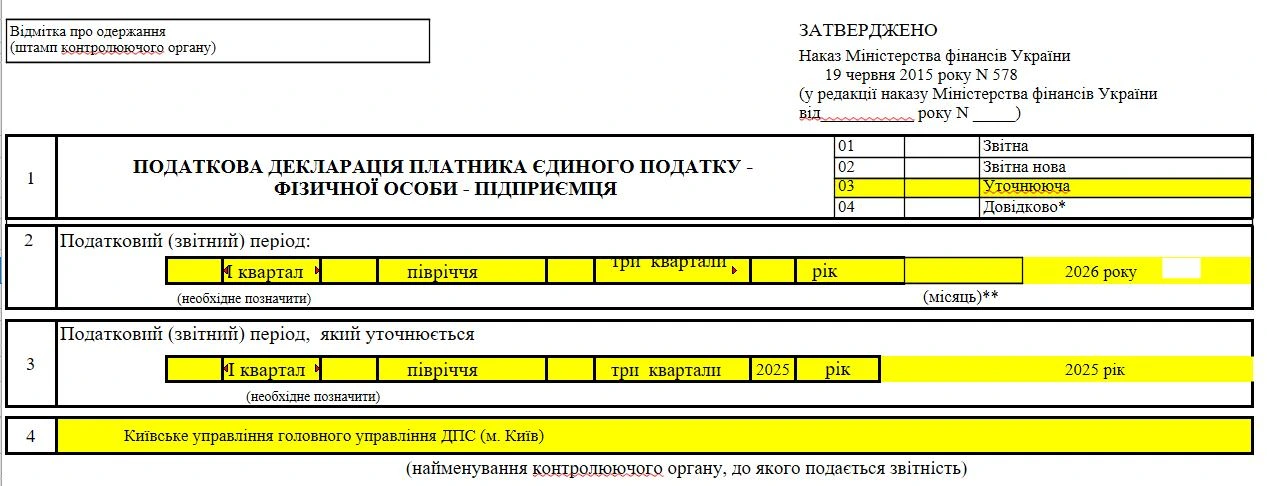
Enter the correct figures. Repeat the correct income, single tax, military levy and other figures cumulatively for the entire period.
Complete the corrections section. It compares the previous return’s figures with the correct amended figures and automatically calculates the increase or decrease in the liability.
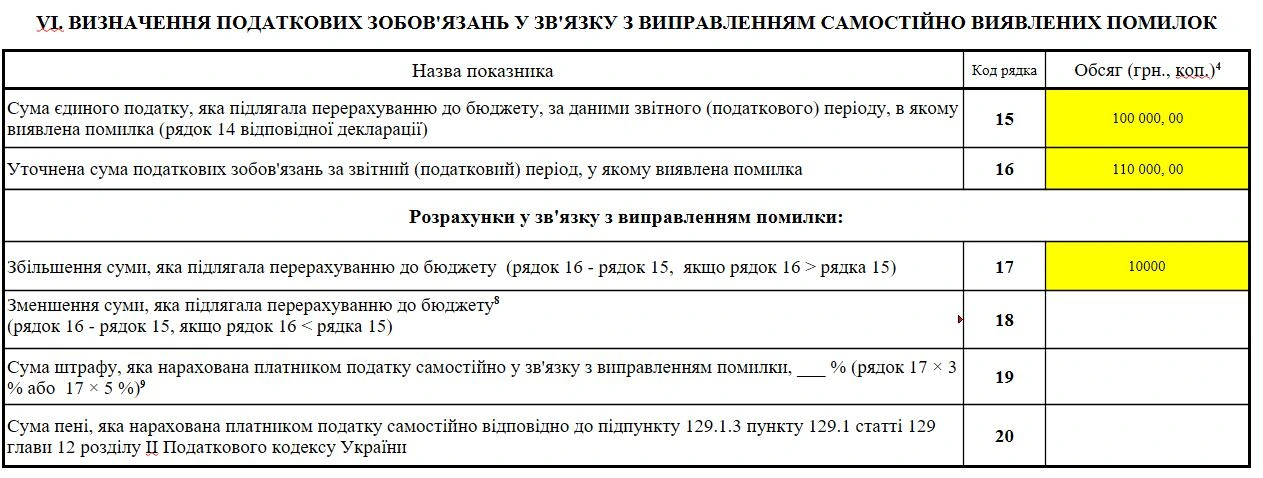
Attach the necessary appendices. If the SSC is incorrect, submit an amended Appendix 1. If the SSC is unchanged, you do not need to attach it again.
Filing is complete only once you receive receipt No. 2 with ‘Accepted’ status.